
TLDR
Managed WooCommerce hosting is a server plus the work that keeps checkout fast under load: PHP workers sized for the peak, an object cache, a real cron, isolation and control over changes. On stores Nera Marketing hosts, sites capped at two PHP workers turned away 31% to 46% of requests. Hosting typically costs from about £19 to £49 a month upwards.
Managed WooCommerce hosting is a server plus the work that keeps a store’s checkout fast at its busiest: enough PHP workers for the peak, an object cache, a real cron, a server of its own when the store needs one, and nobody changing the store mid-sale. Everything here comes from WooCommerce stores Nera Marketing builds and hosts, high-volume stores that sell out timed releases in minutes. On those stores, sites capped at two PHP workers turned away between 31% and 46% of their PHP requests. A plan’s specification sheet rarely shows that number. Nera Marketing builds WooCommerce stores with fast pages, clean product data and structured content that Google and AI models can read, so the right customers find them.
What is managed WooCommerce hosting, and does a store need it?
Managed WooCommerce hosting is a server someone else configures, watches and fixes for your store, rather than one you rent and run yourself. A store needs it once checkout speed costs money: when it runs campaigns, takes orders in bursts or carries custom code. A small store with steady traffic can often manage on less.
| Type | What you get | Who tunes it for WooCommerce | Suits |
|---|---|---|---|
| Shared hosting | A slice of a server shared with many other sites | Nobody. The host’s defaults apply | A new store with low, steady traffic |
| Managed WordPress hosting | WordPress updates, backups and page caching handled | Partly. Page caching is built for content, and checkout cannot be cached | Brochure sites and small stores |
| Managed WooCommerce hosting | A server sized and configured for checkout, monitored, with a team that diagnoses faults | The host | Stores that run campaigns, take orders in bursts or carry custom code |
| Unmanaged cloud server | Raw capacity and nothing else | You or your developer | Teams with their own server engineer |
Is shared hosting enough for a WooCommerce store?
For a small store with steady traffic, often yes. The risk is the neighbours. On a shared server the PHP pools add up with no ceiling, so one bad site can starve the rest.
We have watched that happen. On one store we look after, a third-party plugin ran a database query that timed out every time it ran, and nobody noticed until it took the site down. On a crowded shared server, it would have taken the neighbours down with it.
What should a managed WooCommerce hosting plan include?
Eight things, and a spec sheet shows only some of them: PHP workers sized for the peak, an object cache, a real cron, isolation from other sites, off-server backups, alarms before limits are hit, control over changes, and testing kept off the live server. Ask a host how it handles each one, and get the answers in writing.
| What to ask | A good answer | Why it matters |
|---|---|---|
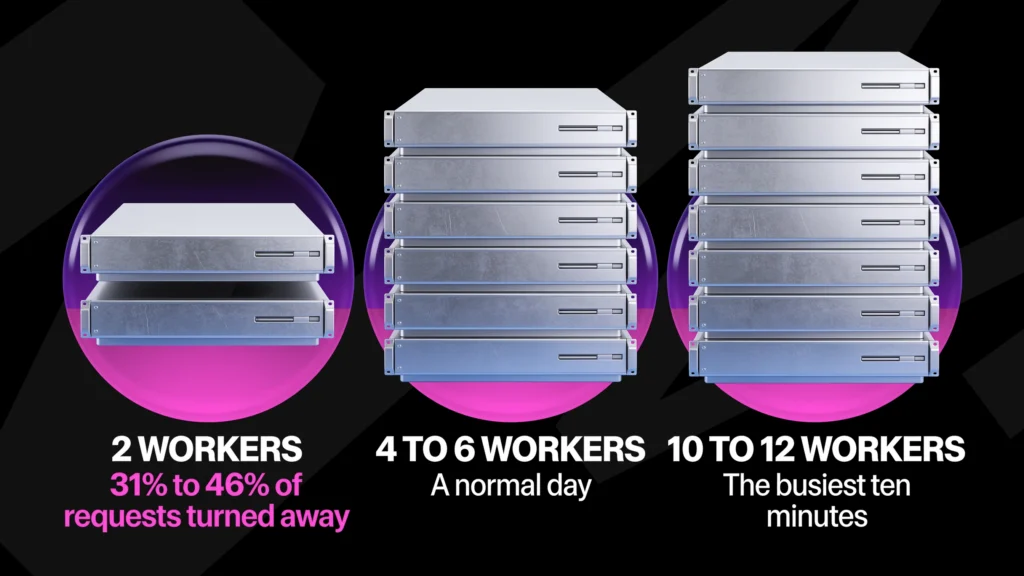
| How many PHP workers, normally and at peak? | Sized for the busiest ten minutes. Nera Cloud plans 4 to 6 per store normally and 10 to 12 at peak | Stores capped at 2 workers turned away 31% to 46% of PHP requests |
| Is there an object cache? | Yes, Redis or similar, persistent | Repeated database questions are answered from memory |
| How do scheduled jobs run? | A server cron every minute, with WP-Cron switched off | WP-Cron only runs when someone loads a page |
| Who else is on the server? | A busy store taking payments gets its own. Others share with a small, named number | One runaway query cannot starve its neighbours |
| How are backups kept? | Daily, off the server, two weeks retained | A restore that does not depend on the server that failed |
| What raises an alarm? | Disk at 70%, processor and memory at 80% | You hear about a full disk before your customers do |
| Who can change the live store, and when? | Updates pause for the length of a sale | An automatic update on a campaign’s final day stalled every new order |
| Where do staging and load tests run? | Never on a live server | A test that shares the live server slows real customers |
WooCommerce’s own hosting guide suggests 5 to 10 dedicated PHP workers as a starting point. That matches what we see at Nera Marketing. On Nera Cloud, the store with 10 workers averaged a daily peak of 8.7 and hit its ceiling at every sale close.
The cron line matters more than it looks. WordPress’s own documentation explains that WP-Cron only checks for due jobs when a page loads. Switching it off without a server cron in its place is worse: one store we prepared for launch had a fault that traced back to exactly that. The full settings we run on Nera Cloud, and why each one matters under load, are in what breaks first when a WooCommerce store gets busy. If the store sits behind a CDN, three rules protect payments: SSL set to Full (strict), no caching on the basket and checkout, and no bot check on the payment provider’s callback address.
Does “unlimited traffic” mean a plan can handle a spike?
No. Unlimited traffic describes how bandwidth is billed, not how many customers can check out at once. Six busy stores on Nera Cloud served about 147 GB a month between them at the server, with databases of 35 MB or less.
What runs out first is PHP workers, because every uncached request, and every checkout, needs one while it runs. A plan with unlimited bandwidth and two workers will still turn customers away on a busy hour.
When does a WooCommerce store need its own server?
When it takes payments in bursts big enough to need settings a shared plan will not allow, or when a fault on it could take other stores down. On Nera Cloud, a busy store taking payments gets its own server. Other live stores share a server with at most three others, and staging never sits on a live server.
One high-volume store Nera Marketing hosts is the clearest example. It sells through TikTok Live, so its busiest minutes arrive all at once. When its checkout started failing during those sales, we moved it to its own server: 16 GB of memory, 8 dedicated cores and 80 PHP workers, up from 10, with a one-minute server cron and a Redis object cache. It now sells around £110,000 a month.
A server of its own also means limits of its own. On that store, PHP memory sits at 1 GB and long jobs can run for up to an hour, so a queued job finishes instead of dying halfway. These settings are set by hand. The PHP-FPM pool settings that decide how many workers a store gets rarely appear in a hosting panel, and an operating system upgrade resets them without warning. We re-check them after every upgrade.
Is a slow store a hosting problem or a code problem?
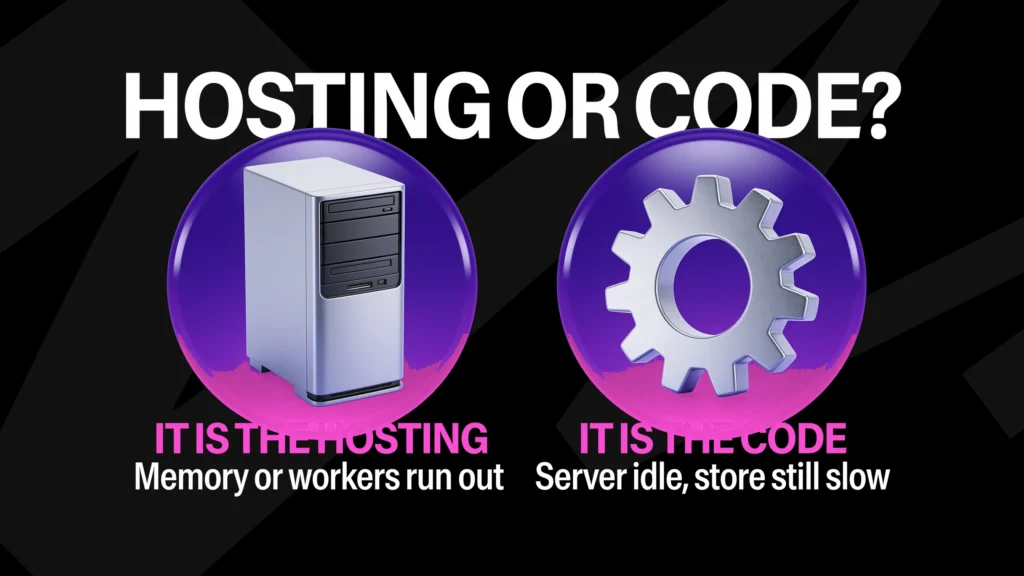
Look at what the server is doing while the store is slow. If it is out of memory or workers, it is the hosting, and more capacity helps. If the server is idle and the store is still slow, it is the code, and a bigger plan will not fix it. Nera Marketing has seen both on busy days.
| Signs it is the hosting | Signs it is the code |
|---|---|
| Memory or worker alerts at the moment it slows | Server resources idle while pages crawl |
| Errors across the whole site at peak, fine off peak | Browsing is fine, but placing an order is slow |
| Slow on every page when busy | Slow even with one customer on the site |
| Better as soon as capacity is added | No change after capacity is added |
Meatbox Family’s first big spike was the hosting. With 300 to 400 people on a live stream and 200 to 300 on the site at once, the store kept falling over. As we told them the next day, it is the most common thing we see on a first big spike, because until a store is live there is no real data on what its peak looks like. More resources, a reconfigured server and caching in front of the busiest pages fixed it. At the next big live, the site slowed when an email went to every customer at the end, but it did not fall over.
A store we were managing on behalf of the client was the opposite. A text to 13,500 subscribers took it from 2,000 requests a minute to 55,000. We added a fourth container, taking it to 400 PHP workers, and nothing improved, because each container was using under 1 GB of memory. One database query, run on every order, was taking 8 seconds. Rewriting it to take 1 second fixed the store.
The other common code cause sits in the WooCommerce checkout itself. In one full load test, browsing, page loads and the basket all held, and only the place-order step failed: two marketing tools were sending tracking data before the order completed, so every customer waited for both. Moving that work to after the order fixed it. That is WooCommerce development work, not hosting, and a store that has already moved host once and kept the same fault usually needs it.
How much does WooCommerce hosting cost in the UK?
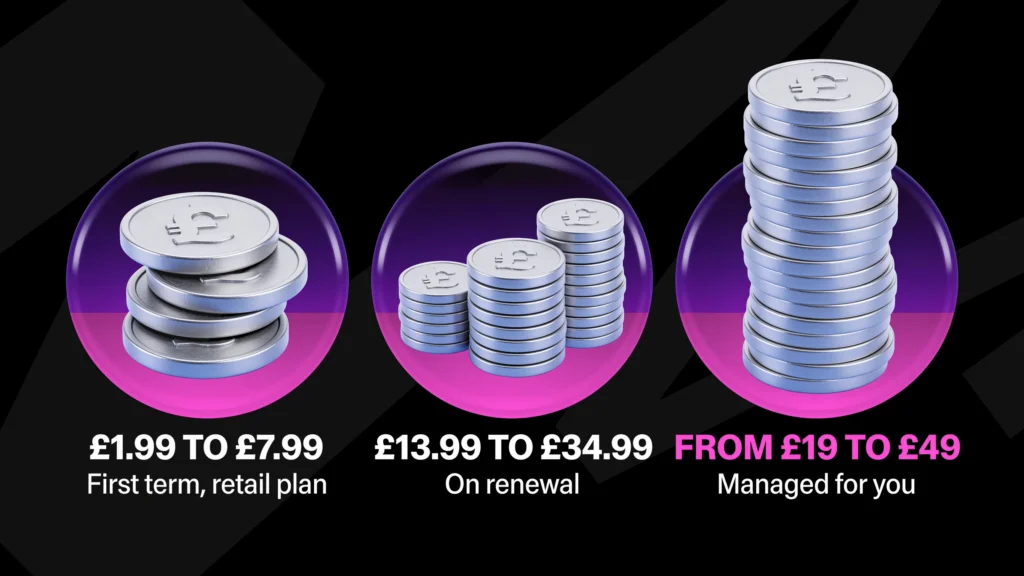
Retail WooCommerce plans start at about £2 a month for the first term and renew at £13.99 to £34.99 a month before VAT. Hosting managed for an established store typically runs from about £19 to £49 a month upwards, depending on its size and traffic. At renewal, the gap is smaller than the headline prices suggest.
These are the WooCommerce plans on SiteGround’s and Hostinger’s UK pricing pages when we checked, all before VAT:
| Plan | First term | On renewal | What the plan lists |
|---|---|---|---|
| SiteGround StartUp | £1.99 a month, 12 months paid up front | £13.99 a month | One website, daily backups. No staging |
| SiteGround GrowBig | £3.99 a month, 12 months up front | £23.99 a month | Adds staging and on-demand backups |
| SiteGround GoGeek | £5.99 a month, 12 months up front | £34.99 a month | Adds Git and priority support |
| Hostinger entry WooCommerce plan | £2.49 a month, 48 months up front (£119.52) | £13.99 a month | 50 GB storage, daily backups |
| Hostinger Cloud Startup | £7.99 a month, 48 months up front (£383.52) | £20.99 a month | 100 GB storage, dedicated resources |
| Managed on Nera Cloud | From about £19 to £49 a month upwards | The same | Server tuned, watched and fixed for you |
Neither WooCommerce pricing page says how many PHP workers a store gets, and neither mentions cron. Those are the two settings that decide a busy hour, so ask before you buy.
Four things move the price of managed hosting:
- PHP workers and processor at peak, because that is what a busy hour uses up.
- Isolation, a server of its own rather than a shared one.
- Management, meaning tuned settings, monitoring and a team that diagnoses faults.
- Backups and retention, how often, where and for how long.
Nera Cloud, the managed hosting Nera Marketing runs, is sized to the volumes a store gives us. A short spike can be covered with one-off extra capacity, and we never move a store to a bigger plan without talking to the owner first. Hosting is billed separately from the build, and when the team that built the store also hosts it, the person who wrote the checkout is the person watching it. What a maintenance plan covers on top of hosting is in what a WooCommerce maintenance plan should cover.
What do you manage yourself on a retail hosting plan?
Everything above the server. A retail plan gives you the server, a control panel, backups and support for the hosting. Caching that leaves the checkout alone, a real cron, tested updates, checkout monitoring and working out why the store is slow on a busy day are yours to set up, usually with plugins you choose, configure and pay for.
| Job | On a self-managed retail plan | Managed on Nera Cloud |
|---|---|---|
| Server, SSL, CDN and daily backups | Included | Included |
| Caching that never serves a stale basket or checkout | You set the rules, often with a plugin | Set up and tested on your store |
| Scheduled jobs | WP-Cron on page load, unless you add a server cron | A one-minute server cron |
| Updates | Automatic, or run and tested by you | Tested on a copy first, paused during sales |
| Checkout and order email monitoring | A plugin or service you choose | Alarms and checks someone watches |
| A slow store on a busy day | You work out whether it is the server or the code | Diagnosed for you, server and code |
| Paid plugin licences | Yours | Yours, in your name, with renewals flagged |
Building it yourself is a real option, and plenty of stores do. The catch is that each job you hand to a plugin is another licence, another update and another piece of code in the checkout’s path. On one store, the same checkout load test passed every time on a clean copy and only 70% to 80% of the time on the live store running 21 plugins.
Why would a store pay an agency more for hosting?
For the people rather than the server, and it pays when an hour of slow checkout costs more than the difference. On one store, each text message send cost £500 to £1,800, and one slow morning left 42 orders stuck in pending payment because customers would not wait. At Nera Marketing, the team that built the store diagnoses it, starting from its code.
If a store trades steadily on a handful of plugins, a retail plan and a developer you trust can be the right answer. The case for paying more grows with every campaign, every custom feature and every plugin in the checkout.
It is also the first decision every new project makes. Our onboarding form asks whether the store will host itself or with us, and in one sweep of our support desk, hosting and performance came up in 40 of 88 support requests. These are the questions store owners ask us most before they decide.
Who notices if the store breaks?
Automated alarms first, then people. On Nera Cloud, alarms fire at 70% disk and 80% processor and memory use, and the team is on seven days a week from early morning to late evening.
We do not offer round-the-clock cover, and we say so. When a store does go down, it is often straight after a plugin update or a new release, which is why updates are tested on a copy first.
How quickly is someone on it if the store goes down during a sale?
We give real figures rather than a promise. On one store, the cause of an outage during a live promotion was found in 80 minutes, and the store was stable about four hours later.
On another, clearing the server cache had the site back in eleven minutes. Ask any host for its response time and its fix time as two separate figures.
Are plugin licences on top of hosting?
Yes, on any host. Paid plugins are licensed separately, usually by the year, and each licence should be in the store owner’s name so it stays with the store. Updates and security fixes depend on a current licence, so whoever looks after the store should flag renewals before they lapse.
How do you move a WooCommerce store to a new host without losing orders?
Move it when no sale is running, overnight or on a quiet weekday evening, and stop orders while the final copy is taken so none land on the old server. Expect about an hour of downtime for the move and up to six hours for DNS to settle. Then place a real order before telling anyone.
Meatbox Family moved on a Wednesday night, between two live streams. On another store we put the site into maintenance mode for a few hours, timed around the sales that week. Both follow the same rule: the store is never mid-sale when it moves. That rule holds for a rebuild too, and rebuilding a WooCommerce store without losing customers, orders or rankings covers the extra steps a rebuild adds before the switch.
Eight things travel badly between hosts, and the incoming team should account for each:
- The PHP version and any custom PHP settings
- The SSL certificate
- Redirects
- Scheduled jobs and the cron
- Caching and CDN rules
- Plugins that only work on the old host
- Server rules, such as the
.htaccessfile - Custom integrations
What should you check in the first day after a move?
That order emails are arriving. Twice in one month, after server moves, order confirmation emails failed, and it looked to the store owner as if sales had stopped when every order was there. Check a real checkout, the customer’s order email, the admin email and that scheduled jobs are running.
What should a host hand over if you leave?
The site files, the full database, the DNS records and the domain code. Customer and order data should move only on the store owner’s written confirmation, and we will not move it on a third party’s word. Owning all of this is one of the real differences between WooCommerce and a hosted platform.
Planning a WooCommerce build?
We design and build WooCommerce stores that turn more visitors into customers.
See WooCommerce development →