
WooCommerce Maintenance and Care Plans: What They Cover, What They Exclude and What You Keep

TLDR
A WooCommerce maintenance plan should cover tested updates, monitoring that catches silent faults, a stated response when something breaks, and clear exclusions. Test updates on a full copy: one checkout test passed 100% on a clean copy and 70% to 80% on a live store with 21 plugins. Get response and fix times in writing, separately.
A WooCommerce maintenance plan should cover four things: updates tested before they reach the live store, monitoring that catches the faults customers never report, a clear response when something breaks, and a written line between what the plan covers and what it does not. Everything here comes from WooCommerce stores Nera Marketing builds and hosts, high-volume stores that sell out timed releases in minutes, where every visitor hits the same product and the same checkout at the same time. On one of them, a plugin took the store down during a live promotion. We had the cause in 80 minutes.
What should a WooCommerce maintenance plan include?
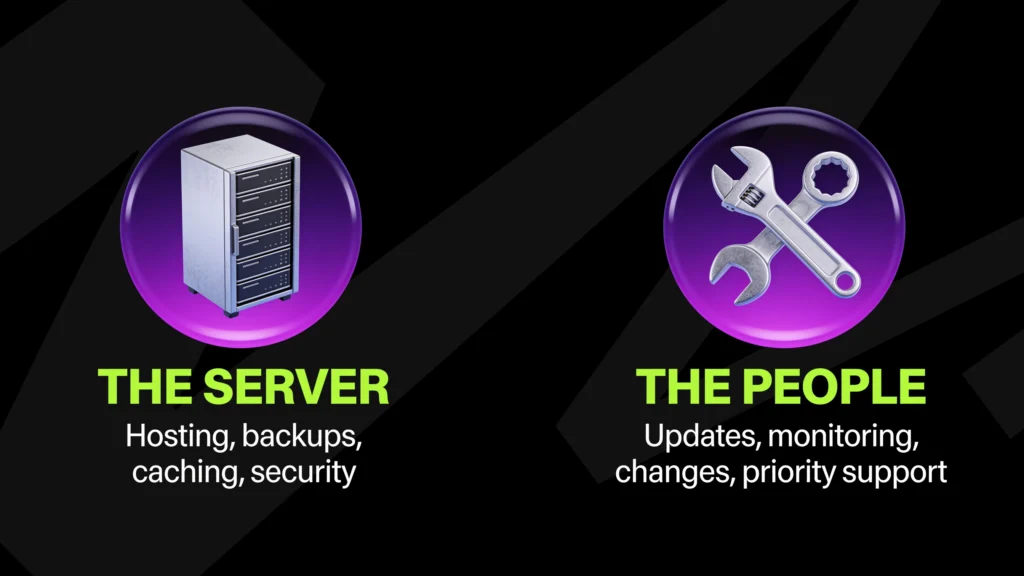
A plan has two halves. The server half is hosting: the machine, backups, caching and security. The people half is what you pay a maintainer for: updates applied and tested, monitoring watched, small changes made and a priority line when something breaks. On the stores we host, most of the cost of a plan sits in the people half.
A WooCommerce store is several pieces of software, each maintained by its own team and updated on its own schedule: WordPress, WooCommerce, the theme, every plugin and the payment provider. When one of them changes, something that worked yesterday can stop. A plan exists to keep up with those changes on your behalf, and to notice quickly when one breaks something. Nera Marketing builds WooCommerce stores that Google and AI assistants can read, trust and point customers to.
| Job | What it protects | Who does it |
|---|---|---|
| WordPress, WooCommerce and plugin updates, tested on a copy first | A checkout that keeps working after other people’s changes | Maintainer |
| Uptime and checkout monitoring, with automated alerts | Faults customers will not report | Maintainer |
| Order and account email checks | Confirmation emails that fail quietly | Maintainer |
| Daily backups, kept off the server | Recovery after a bad change or an attack | Host |
| Disk, CPU and memory alarms | Outages that arrive with no warning | Host |
| Small changes to content and settings | Day-to-day trading | Maintainer |
| Renewing paid plugin licences | Access to updates and security fixes | Store owner pays, maintainer flags renewals |
When the same team builds the store and looks after it, as with the WooCommerce development work we do, the host and the maintainer are one team. When they are two companies, the gaps between them are where faults sit unowned.
Is a care plan or a support plan the same as a maintenance plan?
Usually, yes. Care plan, support plan and maintenance plan are names for the same monthly service, so compare the work each one lists rather than the name. Three lines decide whether a plan protects your orders: updates tested on a full copy of the store, a real checkout tested afterwards, and a stated response when something breaks.
Is a WordPress care plan enough for a WooCommerce store?
Only if it covers what WooCommerce adds. A WordPress plan keeps the site, theme and plugins current. A store also has a checkout, a payment provider, order emails and a database that changes with every order, and each of those needs checking after an update.
The database is the part people miss. Restoring last night’s backup on a brochure site loses a day of edits. On a store it also removes every order placed since that backup, so a plan should say how a restore protects the day’s orders.
How should updates be tested before they reach the live store?
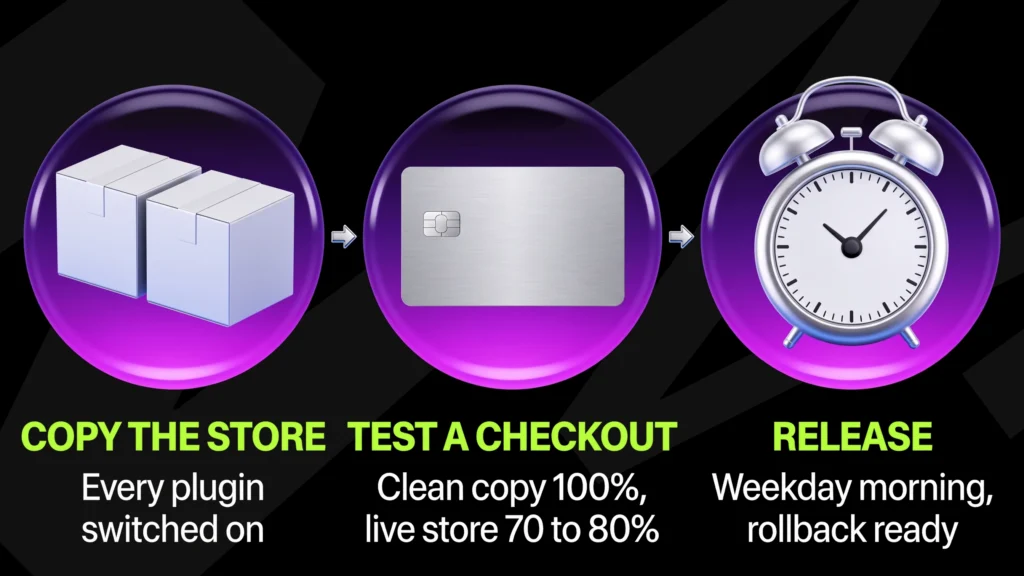
On a copy of the live store with every plugin switched on, then released at a quiet time with a way back ready. The plugins are the risk. The same checkout load test passed 100% of the time on a clean copy of a store and 70% to 80% of the time on the live store running 21 plugins.
A clean copy hides the problem because the problem is the combination. Only a copy carrying the same plugins, settings and data behaves like the store your customers use. WordPress and WooCommerce both tell you to back up before updating. Testing on a full copy is the step that tells you whether you will need that backup.
A copy cloned from a live store carries its dangers with it. When Nera Marketing reviewed a staging copy cloned from one live store, we listed 12 must-fix items. The worst were settings that came across with the clone: the live payment account’s key, the live tracking tags, and a copy that search engines could index.
When the change goes live, three habits keep it safe:
- Release on a weekday morning, when the developers who made the change are at their desks.
- Test a real checkout straight after, not just the homepage.
- Have the rollback ready before you start, so undoing it is one step, not a rebuild.
Should updates pause during a sale?
Yes. On the final day of one campaign an automatic plugin update ran on the store, deactivated a plugin the checkout depended on, and every new order stalled in processing instead of completing. A member of the store’s own team spotted it and reversed it by hand. Updates on that store now pause for the length of every campaign.
Can an update undo a setting without any error?
Yes. On the servers we run, the settings that let a store handle a busy hour are tuned by hand, and an operating system upgrade resets them to the defaults without any warning or error. The store keeps working until the next busy hour. We re-check those settings after every upgrade, and a plan should name checks like that, not just “updates applied”.
What happens when something breaks?
Someone finds the cause, stabilises the store and tells you in writing what happened. On one store we host, a live promotion took the site down just before 6am. We had the cause in 80 minutes. The store was stable about four hours after the first report, with no customer data lost.
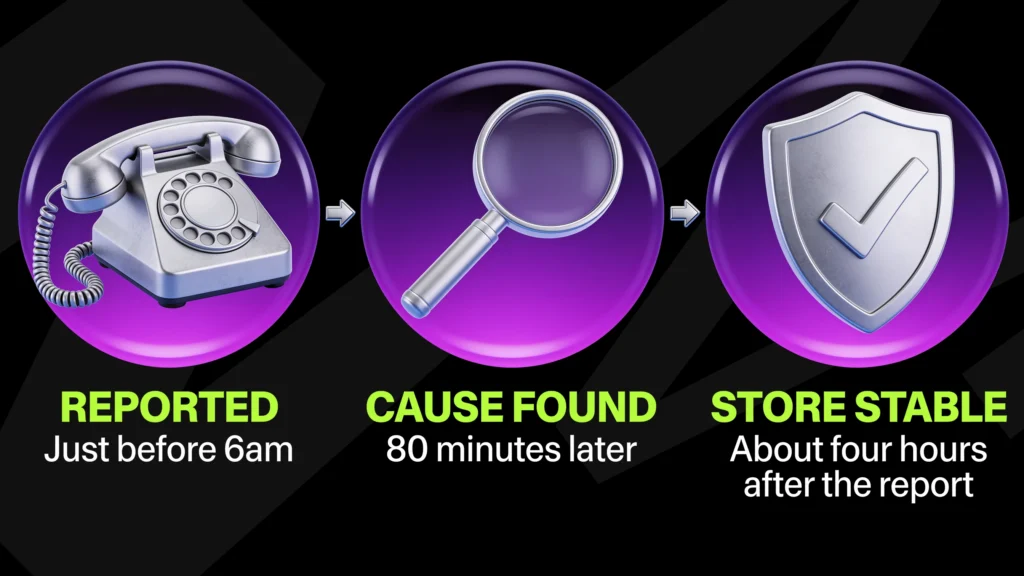
The cause was two things at once. An email marketing plugin, Mailchimp for WooCommerce, was adding background work to every order, and one serial number was stuck in another plugin. Once both were dealt with, pages loaded in under half a second, and the contacts the plugin had missed were added to the email list afterwards.
Not every fault takes that long. On a new store whose site went down on a promotion morning, clearing the server cache had it back in eleven minutes.
Some faults are not on the website at all. When customers on one store could not pay by Apple Pay while card payments worked, the fix was a certificate that only the payment provider could issue. A good maintainer finds that quickly and tells you who has to act.
What is the difference between response time and fix time?
Response time is how quickly someone starts looking. Fix time is how long until the store works again. A plan should state both separately, because a fast reply to a fault that takes a day to fix is still a day of lost orders. In the example above, the cause took 80 minutes and a stable store took about four hours. Ask for both figures in writing.
What should monitoring catch that customers will not report?
The faults that look like something else. Order confirmation emails failing looks to a store owner like sales have stopped, when the orders are all there. We saw it twice in one month after server moves. Monitoring should watch email delivery, disk space and settings that drift, not only whether the homepage loads.
Four faults from stores we look after, each invisible until it was not:
- A full disk. It took a server down with the processor sitting idle. Every server we run now raises an alarm at 70% disk and at 80% processor and memory use.
- A query that failed every time. A third-party plugin ran a database query that timed out on every run, and nobody noticed until the site went down.
- Logging left on full. On one busy day, WooCommerce logging was found at its highest detail level, writing to disk on every request.
- The wrong time zone. A timed sale set to close at 9:30pm showed customers 8:30pm, because the site was set to a fixed offset rather than London time. On several stores Nera Marketing looks after, timed releases ran an hour early after the clocks changed.
The server side of this is covered in more depth in what breaks first when a WooCommerce store gets busy.
What does WooCommerce website maintenance involve, and how often?
Most of it runs on triggers rather than a calendar: every day, after every update, after every server upgrade, before every sale and when a licence renews. A plan that updates monthly and checks only the homepage misses most of it. One checkout test on a live store running 21 plugins passed just 70% to 80% of the time.
| When | What gets checked | Why it matters |
|---|---|---|
| Every day | Backups taken and kept off the server; disk, processor and memory alarms at 70% and 80% | Recovery after a bad change, and a warning before an outage |
| After every update | A real checkout from basket to order email | The same checkout test passed 100% on a clean copy and 70% to 80% on the live store |
| After every server or operating system upgrade | The hand-tuned settings that carry busy hours | An upgrade resets them to defaults with no error |
| Before every sale or campaign | Automatic updates paused; closing times shown in London time | One automatic update stalled every new order on a campaign’s final day |
| When each licence renews | Paid plugin licences, renewed in the store owner’s name | Updates and security fixes depend on a current licence |
Ask any provider which of these rows their plan covers, and how they would know if one was missed.
Who is responsible for what: the host, the maintainer or the store owner?
Three parties share a WooCommerce store, and a plan should say which owns each job. The host keeps the server running and backed up. The maintainer keeps the software current and working. The store owner owns the accounts, the content and the decisions. Faults sit longest in the gaps between them. Phishing lands in those gaps too. Store owners Nera Marketing looks after have forwarded fake Meta “copyright” warnings, one sent from a real university email address, and each one was checked and confirmed as phishing.
| Area | Host | Maintainer | Store owner |
|---|---|---|---|
| Server, uptime and resources | Runs it | Raises issues | n/a |
| Backups | Daily, off the server | Restores when needed | Keeps their own copy too |
| WordPress, WooCommerce and plugin updates | n/a | Tests and applies | Agrees when they run |
| Paid plugin licences | n/a | Flags renewals | Pays, in their own name |
| Payment provider account and certificates | n/a | Diagnoses faults | Owns the account |
| Email platform and customer list | n/a | Checks delivery | Owns the account |
| Domain | n/a | n/a | Registered in their name |
| Products, prices and content | n/a | Small changes on request | Decides and supplies |
Hosting is a separate line from the build and from the maintenance work. For a WooCommerce store it typically runs from about £19 to £49 a month upwards, depending on the store’s size and traffic. On Nera Cloud, our managed hosting, the host and maintainer columns are the same team.
One duty sits with the store owner whoever does the maintenance. As data controller, the store has 72 hours to report a notifiable personal data breach to the Information Commissioner’s Office. A plan should commit the maintainer to telling you quickly. Our terms say without undue delay and, where practicable, within 24 hours.
What does a maintenance plan usually exclude?
New features, faults caused by someone else’s changes, and anything added after handover. Our 12 month build warranty covers defects in our own work. It does not cover a fault caused by WordPress, WooCommerce, a payment provider or a plugin author changing something at their end. Keeping up with those changes is what the maintenance plan is for.
The exclusions worth reading for in any plan:
- New functionality. A new feature is a project, priced before work starts. Writing custom code for made-to-order products is development, not maintenance.
- Changes made by others. Plugins, themes or code added after handover by anyone else.
- Content you supply. Products, prices, text and images.
- One-off jobs. A migration, or extra capacity for a short spike in traffic, priced before they happen.
Where something falls outside the plan, the fair arrangement is the one in our terms: we explain what has happened and price the fix before we start, and you decide whether to go ahead.
Is a warranty the same as a maintenance plan?
No. A warranty is the builder standing behind their own work: defects in what we built are fixed free for 12 months. A maintenance plan is ongoing work to keep up with everyone else’s changes, paid monthly. If someone else changes something and it breaks, we can still help. We just cannot cover it under a warranty for work we did not do.
Retainer or pay as you go: which suits your store?
Pay as you go suits a store that changes rarely and can wait for a priced fix. A retainer suits a store that trades on timed sales, runs paid campaigns or carries custom code, where a slow fix costs more than the plan. On our terms, ongoing services are billed monthly, with no minimum term and 30 days’ notice.
A retainer buys two things pay as you go cannot. The first is priority: your store goes to the front when something breaks. The second is familiarity: the team that built it already knows the code, so diagnosis starts from knowledge rather than discovery. That is how we run support alongside our WooCommerce development work, as an option rather than a condition of the build.
Some setups need a retainer more than others. A business that runs a second store for Ireland has two of every routine job: every promotion, price change and terms update happens twice.
Two terms to check before you sign. Billing is usually monthly in advance, with no part-month refunds on cancellation. And support by email gives both sides a written record of what was asked and what was done.
Does a maintenance plan need 24/7 cover?
Only if the store genuinely trades through the night and the provider genuinely staffs it. At Nera Marketing the team is on seven days a week, from early morning to late evening, with automated monitoring around those hours, and we tell clients exactly that. Ask any provider which they offer, and who answers at 3am if they say 24/7.
What do you keep if you leave?
Everything: the site files, the full database, the domain and every account in your own name. On our terms the export is free, and from a missed payment to anything being deleted is at least 60 days, with written warnings. When one store asked for its domain, the authorisation code went out 18 minutes later.
A handover that works carries more than files. Ours includes the site files, the full database, the DNS records and the domain code, plus a note for the incoming team on the details that break a move: the PHP version, scheduled jobs, caching, redirects and any custom integrations. Logins go into a shared password manager, never into an email.
Two rules protect you. Customer and order data moves only on the store owner’s written confirmation, not on a third party’s say-so. And the move is best done when no sale or campaign is running. The question of what you own when you leave is also one of the real differences between WooCommerce and a hosted platform. If you leave for a rebuild rather than a new provider, what moves in a WooCommerce rebuild sets out the order the data goes in.
What should you ask before signing a maintenance plan?
Ask for the answers in writing, with numbers where there are numbers. Eight questions cover it, and a provider who answers all eight clearly has thought about the work. A provider who answers “everything is covered” has not.
- Are updates tested on a full copy of my store, with every plugin switched on, before they go live?
- Do updates pause during my sales and campaigns?
- What does monitoring watch: uptime only, or checkout, order emails and disk space too?
- What are your hours, and what happens outside them?
- What are your response time and your fix time for an urgent fault, as two separate figures?
- What does the plan exclude, and how are excluded jobs priced?
- Whose name is on the domain, the hosting, the payment account and the email platform?
- If I leave, what do I receive, how quickly, and does it cost anything?
How can you tell whether a care plan is doing anything each month?
Ask for a written record of each month. It should list the updates applied and the versions they moved to, what was tested and the result, every alert and what was done about it, and any changes made on request. If the plan includes hours, it should show how many were used. A month with nothing listed is either very quiet or not being worked, and only the record tells you which.
Planning a WooCommerce build?
We design and build WooCommerce stores that turn more visitors into customers.
See WooCommerce development →